
Upside: Gas & Food Cash Back review
 Analysis by GetAllApps
I judge a cash-back app by more than the promise of earning something back. I want to know whether it fits the way I already shop, whether the steps feel manageable, and whether I can make sensible choices about using it. Upside is a free Travel & Local app from Upside Inc. that focuses on cash back at participating everyday stops, with the idea that its rewards can sit alongside the benefits already attached to a credit or debit card.
That positioning makes it different from a general travel planner or a broad coupon library. I see it as a possible extra layer for people who already make regular trips for fuel, meals, or groceries, not as a reason to travel farther or spend more. The distinction matters: a reward is only useful if the underlying purchase is one I intended to make anyway.
Trust starts with realistic expectations
The app has a 4.6 average from around 456,000 ratings, and it has been installed over 10 million times. Those figures suggest a large audience, but they do not tell me whether a particular offer will be convenient for my route or whether every user will find the redemption process worthwhile. I treat popularity as context, not as a guarantee of personal fit.
Its age rating is Everyone, and it is a mature product that first appeared in 2016. The current version is 26.29.0, with Android support beginning at version 9. That gives prospective users a practical compatibility check before they download: an older device may not meet the minimum requirement, while supported devices can run the current release.
My trust test is deliberately narrow. I would not assume anything about permissions, data handling, account protections, or privacy policy from the app’s purpose alone. Those details should be assessed from the permission prompts and account choices shown on the device. A cash-back service may involve sensitive moments, so I would pause to read each prompt rather than tap through automatically.
That caution is not a reason to dismiss the app. It is a useful habit for any service connected to purchases and rewards. I prefer to understand what I am choosing before enabling access or entering information, and I would revisit those choices if my use of the app changed.
Where it fits in an ordinary routine
The best case for Upside is a routine that already includes eligible stops. Imagine I have a usual commute, need fuel on the way home, and sometimes pick up lunch near work. I can check whether an offer fits a stop I would make regardless, then decide whether the added reward is worth following through with. That is a more sensible workflow than choosing a destination solely because a reward looks attractive.
This also helps answer the most basic question: is it useful if I do not drive every day? It may still suit someone who regularly visits places covered by the app, but its value will depend on how often those ordinary purchases line up with available opportunities. If my spending rarely involves those stops, a different kind of rewards app or the card benefits I already use may be simpler.
Compared with a standard coupon app, Upside is oriented around earning cash back on purchases rather than merely finding a discount to apply at checkout. Compared with a bank or card rewards program, it is an additional channel rather than a replacement for the account that issues the card. The practical appeal is the possibility of combining rewards, but I would verify the offer’s terms and my own card’s rules instead of assuming every reward stacks automatically.
Controls worth checking before committing
When I set up any rewards account, I look for the choices I can make myself: what information is requested, which notifications I can keep or turn off, and how I can manage the account later. I do not treat a permission request as a formality. If a prompt appears, I consider whether that access is necessary for the way I plan to use the app and whether I am comfortable granting it.
This is especially relevant for location-related prompts in travel and local apps. I would decide based on the actual request displayed on my phone, not on assumptions about what Upside must require. If a feature works without a permission, declining may be a reasonable starting point; if an action depends on it, I can decide at that moment whether the convenience is worth the access. The key is to make a choice with the prompt in front of me.
I also recommend checking account settings after initial setup rather than treating the first launch as the last chance to choose. Notification preferences can affect how often an app interrupts the day, while account controls determine how easy it is to adjust participation later. I would look for these options before relying on the app as part of a regular routine, especially if I prefer minimal alerts.
There is a practical trade-off here. Fewer notifications can make an app feel calmer, but they may also mean I need to remember to check it before a purchase. On the other hand, leaving every alert enabled can create noise that makes useful information easier to ignore. I would choose the lightest notification setup that still supports the way I shop.
Make each offer fit the purchase, not the other way around
One useful habit is to check the app before a planned stop, not after I have already paid. That gives me time to compare the opportunity with the route and the purchase I had in mind. I would avoid making a special detour unless the total cost in time, fuel, and effort still makes sense. Cash back can soften a bill, but it does not automatically make an unnecessary trip economical.
A second habit is to keep a simple record of what I expect to happen after a qualifying purchase. If a reward does not appear as I expected, I can check the offer details and my own purchase information while it is still easy to remember. This is not a claim about any particular support process; it is a basic way to make a later question easier to investigate.
A third useful check is to compare the final value with the alternatives I already have. A card may offer its own rewards, and a store may have a direct discount. I would compare the combined result only after reading each offer’s conditions, since a tempting headline is not enough to establish that benefits can be combined. This small pause prevents me from counting the same savings twice in my mental budget.
The app is less compelling for someone who carefully avoids sharing purchase-related information or does not want another account to manage. It may also be the wrong choice for people who prefer a fixed, predictable discount at the point of sale over a reward workflow. In those cases, a straightforward coupon, loyalty program, or existing card reward may feel clearer and involve fewer steps.
Data-sensitive moments deserve a pause
Cash-back services naturally bring a user close to details about where and how they spend. That does not tell me what information this particular app collects or how it uses it, so I avoid drawing conclusions from the category. Instead, I would read the current privacy information and the choices presented during setup, then decide whether the exchange feels acceptable to me.
I would be particularly attentive when the app asks for information connected to an account, a purchase, or location. Before continuing, I would ask whether I understand why the information is requested, whether the choice is optional, and what alternative I have if I decline. If the explanation is unclear, taking time to review it is better than granting access simply to get through onboarding.
That approach also helps keep expectations grounded. The app’s role is to help users pursue cash back, not to make every purchase private by default or to guarantee a specific outcome. I would use it only for transactions where the offer terms are clear to me and where I am comfortable with the choices I have made about the account.
Who is likely to get the most from it
I would recommend trying Upside to someone who makes recurring trips, is comfortable checking an offer before spending, and does not mind managing one more rewards account. The strongest fit is a person who can use it without changing their normal route or buying more than planned. In that situation, the app has a clear job: make routine spending potentially more rewarding.
I would be more cautious if I were trying to cut expenses by a strict amount each month. Rewards can be variable in usefulness because they depend on finding a suitable offer and completing the required steps; they are not the same as lowering a bill in advance. For a tight budget, I would prioritize predictable prices and reliable discounts first, then treat any cash back as an extra rather than money I need to count on.
It is also not a substitute for comparing nearby prices. If the most convenient offer is at a more expensive stop, I would calculate the overall cost rather than focusing on the reward in isolation. A smaller cash-back amount at a place I already pass could be a better choice than a larger-looking incentive that requires extra driving or a purchase I would not otherwise make.
My cautious verdict
Upside has a clear appeal for people who want to add a cash-back option to everyday local spending, and I like the idea of evaluating it alongside existing card rewards rather than treating it as a replacement. Its value depends on personal habits: regular qualifying stops and a willingness to check terms are more important than the headline promise of earning back money.
I would start by reviewing the permissions and account choices shown on my device, setting notifications to a level I can live with, and checking an offer only before a purchase I already planned. I would also keep an eye on whether the extra steps remain worthwhile. If the app becomes a source of detours, clutter, or uncertainty about my spending information, I would stop using it and return to simpler discounts.
Overall, I see it as a potentially useful supplement, not a universal savings tool. For someone whose routine naturally overlaps with its offers and who is comfortable making informed account choices, it may earn a place on the phone. For everyone else, a familiar card program or direct discount may be easier to understand and just as practical.
Pros and cons
Pros
- Cash back can make routine fuel stops more rewarding.
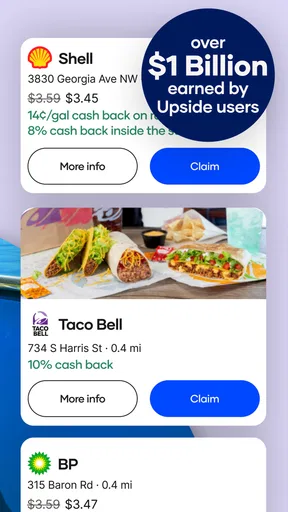
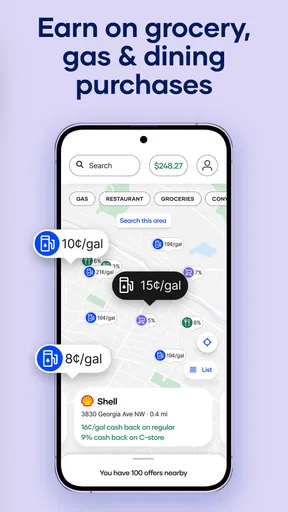
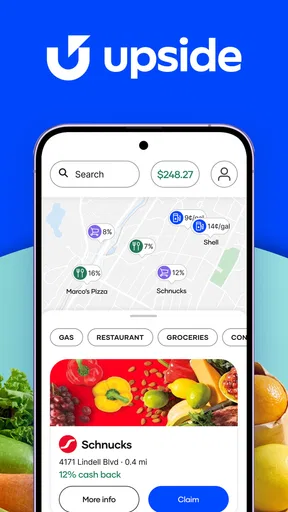
- Nearby offers help users find participating merchants.
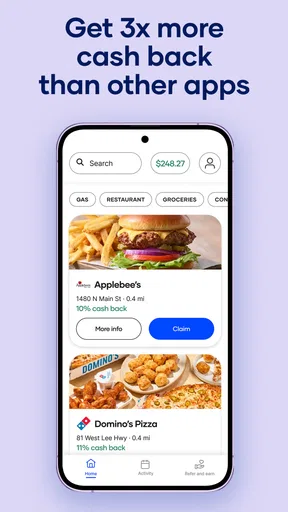
- The app includes deals for groceries and dining too.
- Users can compare offers before choosing where to shop.
- A free account lets users explore available rewards.
Cons
- Offers vary by location and may be limited nearby.
- Cash back requires following each offer's redemption steps.
- Some rewards may take time to appear in an account.
- Not every gas station or retailer participates.
- Users may need to share location data to find local deals.


